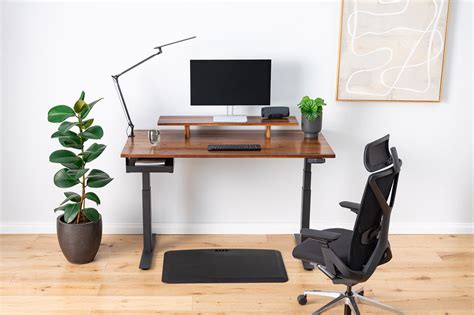
Combating WFH Back Pain: The Ergonomic Chair Solution
Working from home has become the norm for many, bringing with it the flexibility and comfort of your own space. However, it also often means long hours spent at a makeshift desk, and for countless individuals, this translates directly into chronic back pain. A standard dining chair or basic office seat simply isn’t designed for the sustained support your spine needs throughout a workday. This is where a high-quality ergonomic office chair becomes not just a luxury, but a crucial investment in your health and productivity.
The right ergonomic chair can transform your workday, mitigating strain, promoting good posture, and significantly reducing the likelihood of developing or exacerbating back issues. But with a market flooded with options, how do you pinpoint the chair that truly offers the best protection against WFH back pain?
Understanding Ergonomics: More Than Just Comfort
Ergonomics isn’t just about feeling comfortable; it’s about designing products that fit the human body and enhance efficiency and safety in the work environment. For an office chair, this means adjustability and support that align with the natural curves of your spine. A chair that supports proper posture reduces stress on your lumbar spine, prevents muscle fatigue, and improves blood circulation.
Key features define a truly ergonomic chair. Without these, even a plush-looking seat can do more harm than good over an 8-hour workday. Prioritizing these adjustable elements will guide you toward a chair that works *with* your body, not against it.
Essential Features for Back Pain Prevention
1. Adjustable Lumbar Support
This is arguably the most critical feature. Your lower back (lumbar region) has a natural inward curve that needs consistent support. An ergonomic chair should offer adjustable lumbar support, allowing you to move it up, down, in, and out to precisely match the curve of your spine. This keeps your back in a neutral position, preventing slouching and reducing pressure on spinal discs.
2. Seat Depth and Height Adjustment
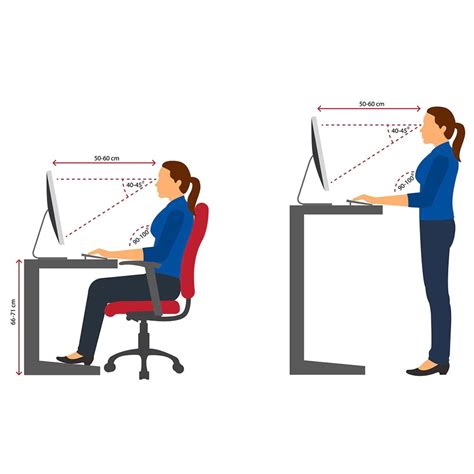
Proper seat height ensures your feet are flat on the floor (or a footrest) and your knees are at a 90-degree angle. Seat depth adjustment allows you to position the front edge of the seat just a few inches from the back of your knees, ensuring full thigh support without cutting off circulation. Both adjustments are vital for maintaining good posture and even weight distribution.
3. Armrest Adjustments
Armrests should be adjustable in height, depth, and sometimes pivot. When properly adjusted, they should allow your arms to rest comfortably, keeping your shoulders relaxed and elbows at a 90-degree angle close to your body. This takes pressure off your neck and shoulders, which often contributes to upper back pain.
4. Recline and Tilt Mechanisms
A good ergonomic chair offers synchronous tilt or a multi-functional tilt mechanism. This allows the backrest and seat to recline together or independently, distributing your body weight and relieving pressure points. A tension adjustment lets you control the effort required to recline, making it suitable for your body weight. Reclining slightly (e.g., 100-110 degrees) can also reduce spinal disc pressure.
5. Headrest (Optional but Recommended)
While not strictly necessary for everyone, a well-designed, adjustable headrest can provide crucial support for your neck and upper spine, especially during moments of rest or when leaning back. It helps prevent neck strain, which can often radiate into upper back pain.
6. Material and Breathability
Consider materials that offer both comfort and durability. Mesh backs are popular for their breathability, preventing heat buildup during long sitting sessions. High-quality foam padding in the seat is also essential for sustained comfort.
Finding Your Best Fit: Prioritize Personalization
Ultimately, the “best” ergonomic chair is highly personal. What works for one person might not be ideal for another due to differences in body shape, height, and specific pain points. If possible, try out different chairs before making a purchase. Pay attention to how the adjustments feel and whether the chair truly supports you in a neutral, comfortable posture.

Beyond the Chair: A Holistic Approach to WFH Health
While a premium ergonomic chair is a game-changer, remember it’s one component of a healthy WFH setup. Complement your chair with:
- Proper Desk Height: Ensure your keyboard and mouse are at a height that allows your elbows to stay at 90 degrees.
- Monitor Placement: Position your monitor at arm’s length, with the top of the screen at or slightly below eye level.
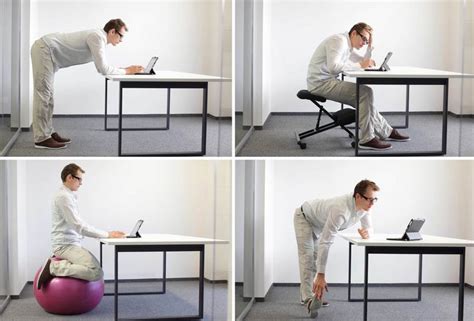
- Regular Breaks: Stand, stretch, and walk around every 30-60 minutes to break up prolonged sitting.
- Core Strengthening: Regular exercise to strengthen your core muscles can also significantly alleviate back pain.
Conclusion
Investing in a high-quality ergonomic office chair is one of the most effective steps you can take to prevent and alleviate WFH back pain. Look for extensive adjustability, especially in lumbar support, seat depth and height, and armrests. Combine this investment with good posture habits and regular movement, and you’ll be well on your way to a more comfortable, pain-free remote work experience. Your back will thank you.