Combating WFH Back Pain: The Ergonomic Chair Solution
Working from home has brought unprecedented flexibility, but it has also introduced new challenges, particularly for our physical well-being. Long hours spent at a makeshift desk, often in an unsuitable chair, can quickly lead to debilitating back pain, neck strain, and overall discomfort. The solution isn’t just to take more breaks—it’s to invest in the right foundation: an ergonomic desk chair specifically designed to support your body through extended periods of sitting.
A truly ergonomic chair is more than just a comfortable seat; it’s a sophisticated tool engineered to promote good posture, reduce pressure points, and minimize the risk of musculoskeletal issues. It’s an investment in your health, productivity, and long-term comfort.
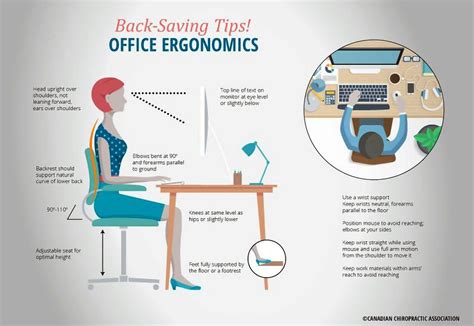
Key Features of an Effective Ergonomic Desk Chair
When searching for a chair to combat WFH back pain, several key features are non-negotiable. The goal is adjustability, support, and customization to your unique body shape and work style.
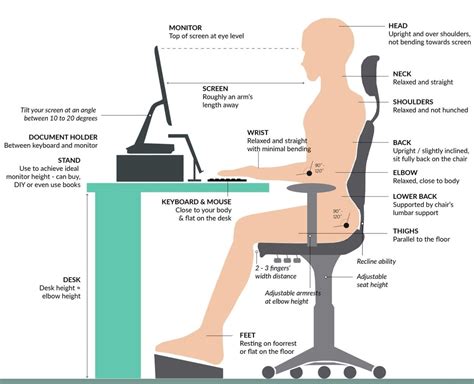
- Adjustable Lumbar Support: This is crucial. Your chair should provide proper support for the natural inward curve of your lower back, preventing slouching and reducing spinal disc compression. Look for chairs with adjustable height and depth for the lumbar support.
- Seat Height Adjustment: Your feet should be flat on the floor or a footrest, with your knees at a 90-degree angle. A pneumatic lift mechanism allows for easy adjustment.
- Seat Depth and Width: The seat should be wide enough to support you comfortably and deep enough so that you can lean back against the backrest with about 2-4 inches between the edge of the seat and the back of your knees.
- Armrests: Adjustable armrests (height, width, depth, pivot) are vital to support your arms and shoulders, taking pressure off your neck and upper back. They should allow your elbows to rest at a 90-degree angle while typing.
- Backrest Recline and Tension: A good ergonomic chair allows you to recline and adjust the tension, enabling you to periodically change your posture and alleviate pressure. Some chairs offer synchronous tilt, where the seat and backrest move together.
- Headrest (Optional but Recommended): For those who frequently recline or need neck support, an adjustable headrest can be a significant benefit.
- Swivel Base and Wheels: A stable five-point base with smooth-rolling casters allows for easy movement and access around your workspace without straining.

Top Contenders in Ergonomic Chair Design
While specific models vary widely in price and features, several brands are consistently lauded for their ergonomic excellence and ability to prevent discomfort from prolonged sitting. These often incorporate advanced engineering and high-quality materials to deliver superior support.
Brands like Herman Miller (e.g., Aeron, Embody), Steelcase (e.g., Leap, Gesture), and Haworth (e.g., Zody, Fern) are often considered the gold standard. While they represent a significant investment, their durability, comprehensive adjustability, and long-term health benefits often justify the cost for dedicated WFH professionals. There are also many excellent mid-range options from brands like Secretlab, ErgoTune, and Branch, which offer a great balance of features and affordability.

Choosing the Right Ergonomic Chair for You
The “best” ergonomic chair is highly personal. What works for one person might not work for another. Consider the following when making your selection:
- Budget: Determine what you’re willing to spend. Remember, it’s an investment in your health.
- Your Body Type: Some chairs are designed for specific body types (tall, short, heavy, light). Check weight limits and recommended user heights.
- Trial Periods: Many reputable retailers and brands offer trial periods. Take advantage of these to test the chair in your actual WFH environment.
- Reviews and Research: Read unbiased reviews and watch video demonstrations to understand the chair’s features and performance.
- Material: Consider breathable mesh for ventilation, or durable fabric/leather for comfort and aesthetics.

Beyond the Chair: A Holistic Ergonomic Approach
While an excellent ergonomic chair is foundational, it’s only one piece of the puzzle. To truly prevent back pain and promote overall well-being during long WFH hours, consider these additional ergonomic practices:
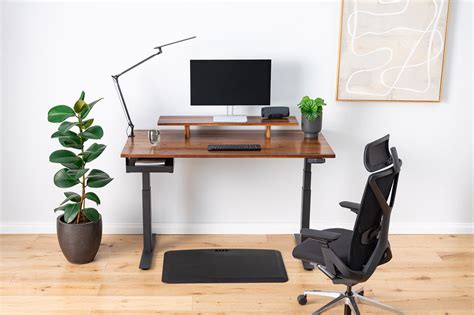
- Desk Height: Ensure your desk allows your keyboard and mouse to be at a comfortable height, keeping your wrists straight.
- Monitor Placement: Position your monitor at arm’s length, with the top third of the screen at eye level.
- Regular Breaks: Stand up, stretch, and walk around for a few minutes every hour.
- Proper Lighting: Reduce eye strain with adequate, glare-free lighting.
- Mindful Posture: Even in the best chair, periodically check in with your posture and make micro-adjustments.

Conclusion
Investing in a high-quality ergonomic desk chair is perhaps the single most impactful step you can take to prevent and alleviate back pain from long WFH hours. By understanding the key features and taking a personalized approach to selection, you can transform your workspace into a healthy, comfortable, and productive environment. Prioritize your spinal health; your future self will thank you.