Combating WFH Back Pain: A Man’s Guide to Ergonomic Essentials
Working from home has revolutionized our professional lives, offering unparalleled flexibility. Yet, for many men clocking long hours at their makeshift or dedicated home offices, this convenience often comes at the cost of persistent back pain. The sedentary nature of desk work, coupled with suboptimal setups, can lead to chronic discomfort, reduced productivity, and long-term musculoskeletal issues. The good news? Strategic investment in the right ergonomic gear, combined with mindful practices, can make a profound difference.

The Foundation: A Superior Ergonomic Chair
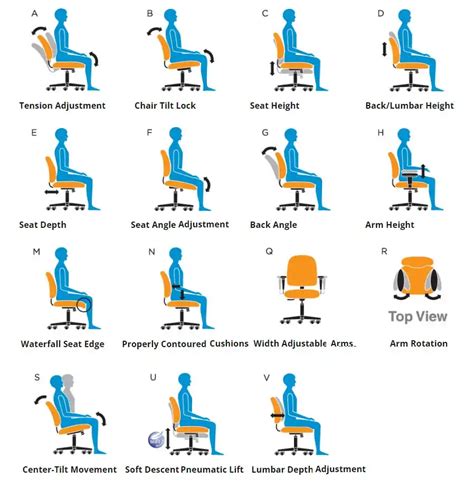
Perhaps the single most crucial piece of ergonomic equipment is a high-quality office chair. For men, given typical broader shoulders and sometimes heavier builds, finding a chair that offers adequate support and adjustability is paramount. Look for chairs with:
- Lumbar Support: Adjustable to fit the natural curve of your lower back. Some chairs offer dynamic lumbar support that adapts to your movements.
- Seat Depth Adjustment: Ensures your thighs are fully supported without the front edge digging into the back of your knees, leaving a small gap (about 2-4 fingers) between the seat edge and your calves.
- Armrests: Adjustable in height and pivot to support your forearms and reduce tension in your shoulders and neck.
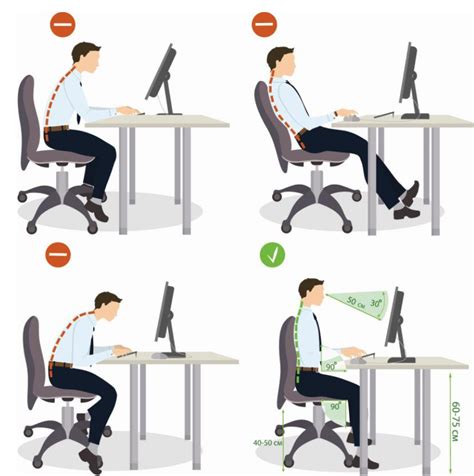
- Height Adjustment: Allows you to keep your feet flat on the floor (or a footrest) with your knees at roughly a 90-degree angle.
- Breathable Material: Especially for long hours, materials that prevent heat buildup are a plus.
Investing in a chair from reputable brands known for their ergonomic designs is often worth the upfront cost for long-term health benefits.
Dynamic Workflows: The Adjustable Standing Desk
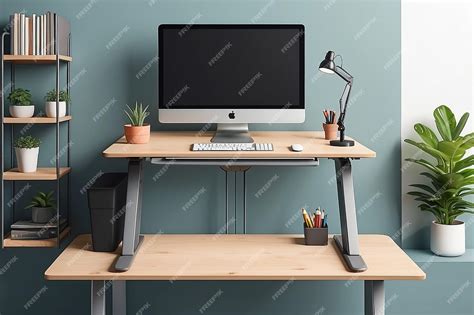
While an excellent chair is vital, the human body isn’t designed for static sitting. An electric height-adjustable standing desk allows you to seamlessly transition between sitting and standing throughout your workday. This movement is key to preventing muscle stiffness, improving circulation, and reducing pressure on the spinal discs.
- Motorized Adjustment: Smooth, quiet electric motors are preferred for easy transitions.
- Memory Presets: Save your ideal sitting and standing heights for quick adjustments.
- Stable Surface: Ensure the desk is sturdy at all heights to prevent wobbling, especially if you have multiple monitors.
Start with short standing intervals and gradually increase them. Pair your standing desk with an anti-fatigue mat to further reduce strain on your feet and legs.
Optimizing Your Visual Interface: Monitor Arms
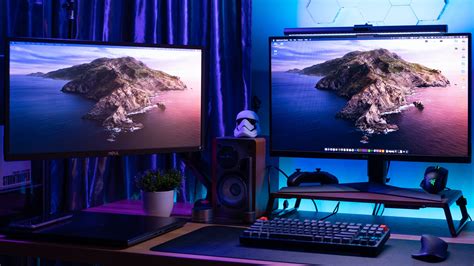
Incorrect monitor placement forces your neck into awkward positions, leading to neck and upper back pain. A fully adjustable monitor arm (or arms, for a multi-monitor setup) is a game-changer.
- Eye-Level Positioning: The top of your monitor screen should be at or slightly below eye level, with the screen about an arm’s length away.
- Flexibility: Allows you to easily adjust height, tilt, and swivel to reduce glare and accommodate different postures (sitting vs. standing).
- Space Saving: Frees up valuable desk space.
This simple addition ensures your head remains neutral, directly stacked above your spine, alleviating unnecessary strain.
Peripheral Perfection: Ergonomic Keyboard and Mouse
Even small peripherals can contribute significantly to discomfort, especially during long typing and mousing sessions. Repetitive strain injuries (RSIs) are common in wrists and hands, which can radiate to the arms and shoulders.
- Ergonomic Keyboard: Consider split, curved, or vertical designs that allow your wrists to maintain a natural, neutral position.
- Ergonomic Mouse: Vertical mice or trackballs can reduce forearm pronation and wrist extension, keeping your hand in a more natural “handshake” position.
- Wrist Rests: Use a gel or foam wrist rest only to support your palm or the heel of your hand during breaks, not while actively typing or mousing, to avoid pressure on the carpal tunnel.
Beyond the Gear: Movement and Mindset
While ergonomic gear provides the necessary support, it’s crucial to remember that no amount of equipment can substitute for regular movement. Incorporate short breaks every 30-60 minutes to stand, stretch, or walk around. Simple stretches for the neck, shoulders, and lower back can prevent stiffness and improve circulation. Maintaining good posture, even when standing, is also key. Your ergonomic setup is a tool; consistent, mindful usage is what truly prevents back pain during those demanding WFH hours.

Conclusion: Invest in Your Back, Invest in Your Productivity
For men navigating the demands of long WFH hours, preventing back pain isn’t just about comfort—it’s about sustained health and productivity. By strategically choosing an ergonomic chair, integrating an adjustable standing desk, optimizing monitor placement, and upgrading your peripherals, you create a workspace that supports your body, rather than detrimental to it. Combine these tools with a commitment to regular movement and good posture, and you’ll build a resilient foundation against the challenges of a sedentary work life, ensuring your back remains strong and pain-free.