Investing in Your Well-being: The Ergonomic Imperative
In today’s remote and hybrid work landscape, our desks have become more than just surfaces – they are our command centers for daily tasks, creativity, and connection. Yet, many of us spend countless hours hunched over less-than-ideal setups, unknowingly sacrificing our health and hindering our productivity. An ergonomic desk setup isn’t a luxury; it’s a strategic investment in your long-term well-being and peak performance. But what exactly constitutes a truly ergonomic workstation, and what gear is genuinely “must-have”?
Beyond Comfort: The True Value of Ergonomics
The concept of ergonomics centers on designing and arranging workplaces to fit the user, rather beyond forcing the user to fit the workplace. For desk workers, this translates into significant benefits: reduced risk of musculoskeletal disorders (like carpal tunnel syndrome, back pain, and neck strain), improved posture, increased energy levels, and ultimately, enhanced focus and productivity. When your body is comfortable and supported, your mind is free to concentrate on the task at hand, not on nagging aches and pains. Ignoring ergonomics can lead to chronic issues, medical expenses, and a noticeable dip in daily output.
The Foundation: A High-Quality Ergonomic Chair
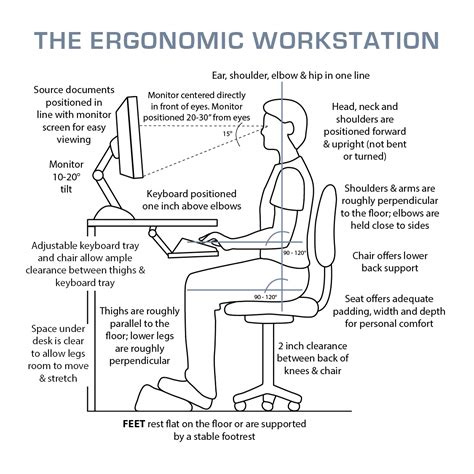
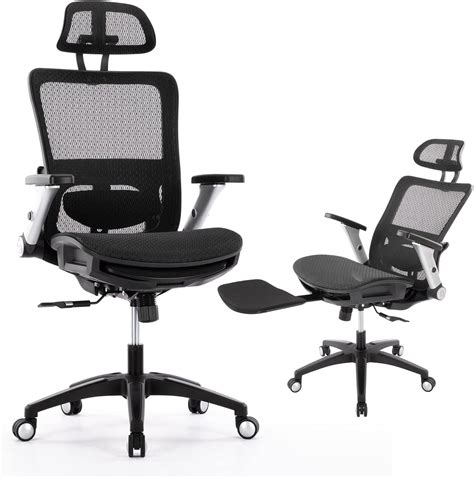
If there’s one piece of gear you shouldn’t skimp on, it’s your office chair. A truly ergonomic chair is designed to support the natural curve of your spine, promote healthy posture, and distribute your weight evenly. Look for chairs with adjustable lumbar support, seat height, seat depth, armrests, and tilt mechanisms. The ability to customize these features allows you to tailor the chair to your unique body dimensions, ensuring optimal support throughout your workday. Investing in a good chair can dramatically reduce back and neck pain, making long hours at the desk far more manageable and less detrimental to your health.
Dynamic Work: Standing Desks and Monitor Arms
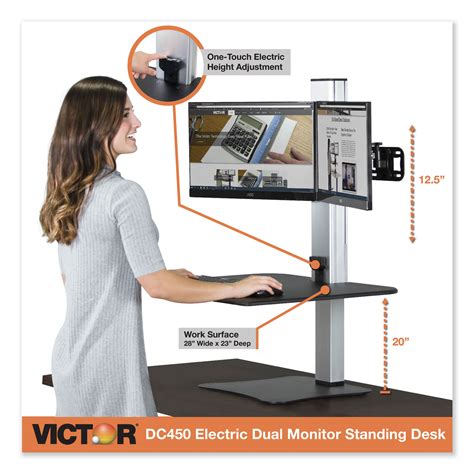
While a great chair is crucial, static sitting for eight hours a day is still detrimental. This is where a standing desk comes into play. An electric sit-stand desk allows you to easily alternate between sitting and standing throughout the day, improving circulation, reducing sedentary time, and burning more calories. It’s a game-changer for energy levels and overall physical health.
Complementing your standing desk is a monitor arm. This often-overlooked accessory allows you to position your monitor(s) at the ideal height and distance – typically with the top of the screen at or slightly below eye level, and an arm’s length away. Proper monitor placement prevents neck strain and slouching, whether you’re sitting or standing. Many arms also free up valuable desk space.
Precision & Comfort: Ergonomic Keyboard and Mouse
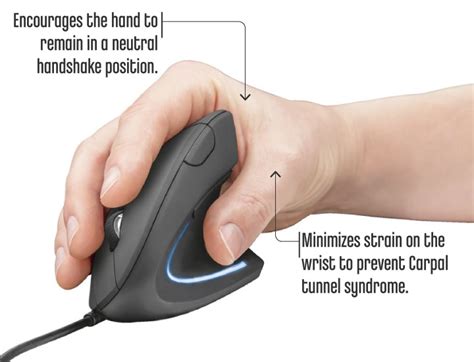
Your hands and wrists are constantly engaged when working at a computer, making ergonomic input devices essential. An ergonomic keyboard, often split or curved, encourages a more natural hand and wrist position, reducing strain that can lead to carpal tunnel syndrome or repetitive strain injuries (RSIs). Similarly, an ergonomic mouse, designed to fit the natural curve of your hand, can prevent wrist pronation and alleviate discomfort. Trackballs or vertical mice are popular alternatives that keep the wrist in a more neutral “handshake” position. Don’t underestimate the impact these small changes can have on your long-term comfort and health.
The Supporting Cast: Lighting, Footrests, and Cable Management
Beyond the major pieces, several accessories contribute significantly to a truly ergonomic setup.
- Proper Lighting: Good task lighting can reduce eye strain and headaches. Position your desk lamp to illuminate your workspace without creating glare on your screen. Natural light is ideal, but avoid direct sunlight on your monitor.
- Footrest: If your feet don’t sit flat on the floor when your chair is at the correct height, a footrest can provide support and improve circulation in your legs.
- Anti-Fatigue Mat: For standing desk users, an anti-fatigue mat is essential to reduce strain on your feet, legs, and back during prolonged standing periods.
- Cable Management: While not directly ergonomic, a tidy workspace reduces visual clutter and stress, contributing to a more productive environment.

Is It Must-Have? Absolutely.
The question isn’t whether ergonomic gear is a luxury; it’s whether you prioritize your long-term health and daily productivity. Investing in an ergonomic desk setup is an investment in yourself – your physical comfort, mental clarity, and professional output. By equipping your workstation with a high-quality ergonomic chair, a dynamic standing desk, proper monitor placement, and supportive input devices, you’re not just buying gear; you’re building a foundation for a healthier, more productive working life. Make the switch, and feel the difference.